Why JIT Access Changes Everything for Cloud Security
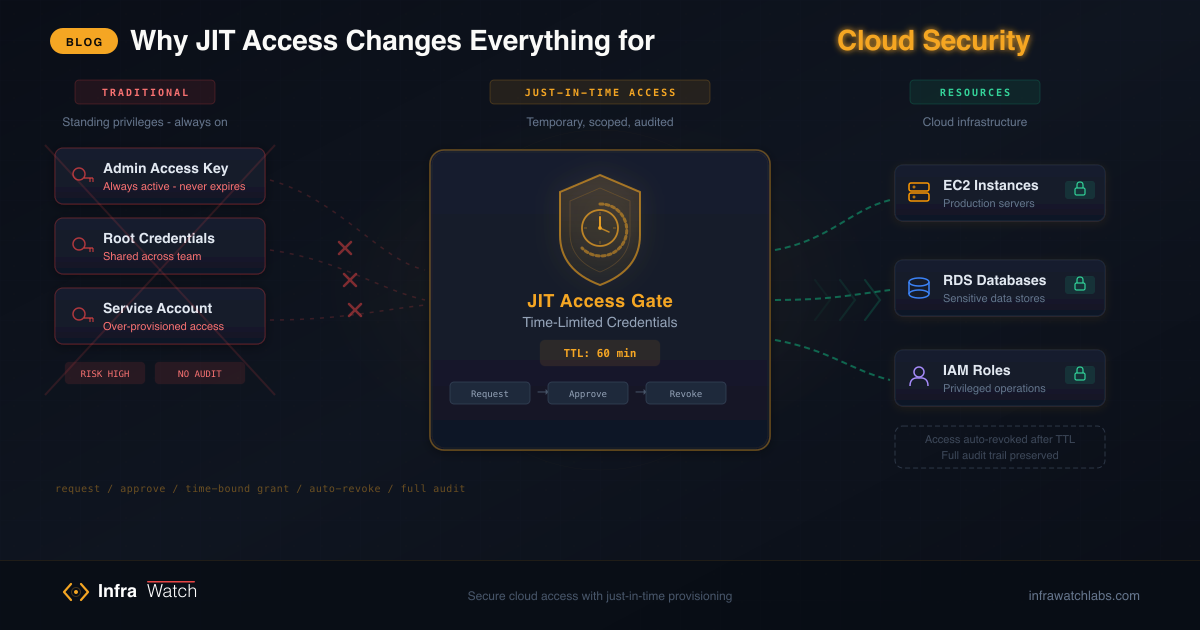
Standing access is the biggest security risk in most AWS environments. JIT (Just-In-Time) access eliminates it. Here is how it works and why InfraWatch builds it in from day one.
Here is a scenario that plays out in thousands of engineering organizations every day: a developer needs access to an RDS database to debug a production issue. They ask in Slack, someone shares credentials, the developer fixes the issue, and life goes on. Those credentials are never rotated. Six months later, the developer has moved to a different team, but they still have production database access.
This is standing access, and it is the single biggest security risk in most AWS environments.
The Standing Access Problem
Standing access means permanent, always-on credentials that exist whether they are actively needed or not. In AWS, this typically looks like:
- Long-lived IAM access keys assigned to individual developers
- Shared credentials passed around in Slack, email, or password managers
- Overly broad IAM policies because “it is easier to give admin than figure out the minimum permissions”
- Forgotten access that is never revoked when roles change or people leave
The numbers are sobering. According to multiple cloud security reports, the average enterprise has three to five times more active IAM credentials than active employees. Unused access keys older than 90 days are found in over 80% of AWS accounts audited. And most security breaches involving AWS start with compromised long-lived credentials.
The fundamental problem is simple: if credentials exist, they can be compromised. The longer they exist, the more likely they are to leak. And the broader their permissions, the more damage a compromise can cause.
What JIT Access Actually Means
Just-In-Time (JIT) access flips the model entirely. Instead of giving people permanent credentials and hoping nothing goes wrong, JIT systems grant access only when it is needed, for only as long as it is needed, with only the permissions that are needed.
The workflow looks like this:
- A user requests access to a specific AWS service for a specific purpose
- An approver reviews and approves (or denies) the request
- Temporary credentials are generated with scoped permissions and a defined expiration
- The credentials auto-expire when the time window closes — no manual cleanup
No standing credentials. No shared secrets. No forgotten access keys. Every access event is intentional, approved, scoped, and logged.
How AWS STS Makes This Possible
AWS Security Token Service (STS) is the underlying mechanism that makes JIT access practical. STS can generate temporary security credentials — an access key, secret key, and session token — that are valid for a configurable duration (15 minutes to 12 hours, depending on the configuration).
When a JIT system generates STS credentials, it uses AssumeRole with specific parameters:
- RoleArn: The IAM role to assume, which defines the permission boundary
- RoleSessionName: A unique identifier for the session (typically the requesting user’s identity)
- DurationSeconds: How long the credentials remain valid
- Policy: An optional inline policy that further restricts permissions beyond the role’s default
The resulting credentials are mathematically guaranteed to expire. They cannot be extended after issuance. And they are scoped to the intersection of the assumed role’s permissions and any inline policy restrictions.
This is fundamentally different from long-lived access keys. There is no credential to rotate, no secret to manage, and no risk of forgotten access. When the session ends, the access is gone.
The Audit Trail Advantage
JIT access does not just improve security — it transforms your audit capabilities. When every access event goes through a request-approval workflow, you get a complete record of:
- Who requested access
- What they requested access to
- When the request was made and approved
- Why they needed it (captured in the request description)
- How long the access was active
- Who approved the request
Compare this to standing access, where the best you can do is CloudTrail logs showing that “someone used access key AKIA… to call DescribeInstances.” With JIT, you know that “Jane from the backend team requested read access to the production RDS cluster to investigate slow query #1234, approved by Mike at 2:15 PM, with credentials expiring at 3:15 PM.”
This level of audit detail is not just useful for security reviews — it is increasingly required for compliance frameworks like SOC 2, ISO 27001, and PCI DSS, all of which expect organizations to demonstrate time-bound, purpose-driven access controls.
Why Most Teams Do Not Implement JIT
If JIT access is so clearly better, why is it not the default everywhere? The honest answer: it is a pain to implement.
Building a proper JIT system requires:
- A request-approval workflow with notification and escalation
- Integration with AWS STS for credential generation
- Role management to define what each user can request
- Session tracking to monitor active credentials
- An audit log that captures the full lifecycle
- A user interface that makes requesting access fast enough that developers do not route around it
Most organizations end up choosing between buying an expensive PAM (Privileged Access Management) tool or building something custom on top of AWS SSO and Step Functions. Both options are complex, expensive, or both.
How InfraWatch Approaches JIT
InfraWatch builds JIT access directly into the monitoring platform. This is not an afterthought or a bolt-on — it is a core feature that ships out of the box.
Here is how it works:
Roles Define Permission Boundaries
Admins create roles that map to specific AWS service permissions. Each role defines what services a user can monitor and what STS credentials they can request. Roles are hierarchical: Employee, Manager, and Admin, each with configurable service scoping.
Role-Driven Access
When a user needs AWS credentials, their assigned role determines what they can access. Roles define which AWS services are available and what level of permissions are granted. Users generate temporary credentials directly through the InfraWatch UI — scoped to their role, no approval bottleneck.
Automatic STS Credential Generation
InfraWatch calls AWS STS to generate temporary credentials scoped to the user’s role permissions. The credentials are delivered through the UI and expire automatically at the configured duration.
MFA Enforcement
InfraWatch can require multi-factor authentication before granting access to sensitive services. This adds a second layer of verification to the approval workflow, ensuring that even if someone’s session is compromised, they cannot obtain AWS credentials without the MFA code.
Full Audit Trail (coming soon)
A comprehensive audit trail for every credential generation, access event, and expiration is on the roadmap. This will be available to Admins via the Admin Panel, with support for export to SIEM and compliance reporting tools.
The Key Insight: Monitoring Plus Access
The real power of InfraWatch’s approach is that monitoring and access management live in the same platform. This creates a natural feedback loop:
- Engineers see something unusual in the monitoring dashboard
- They request JIT access to investigate
- The investigation is logged alongside the monitoring data
- The access expires when the investigation is complete
There is no context switching between tools. No copying credentials from one system to paste into another. The workflow is: see a problem, get access to fix it, fix it, move on. The access disappears automatically.
This is what zero-trust access looks like in practice — not a product category, but a natural consequence of building access management into the tools engineers already use.
Getting Started with JIT in InfraWatch
JIT access works out of the box with InfraWatch. Here is what you need:
- Deploy InfraWatch via Docker Compose or Helm
- Configure an IAM role that InfraWatch can assume via STS (see IAM Setup)
- Create user roles with appropriate service permissions
- Enable MFA for sensitive service access (optional but recommended)
The entire setup takes about 10 minutes on top of the base InfraWatch deployment.
The Bigger Picture
JIT access is not a silver bullet for cloud security. You still need network segmentation, encryption, vulnerability management, and all the other fundamentals. But eliminating standing credentials removes the single most exploited attack vector in cloud environments.
Every credential that does not exist cannot be compromised. Every access window that auto-closes cannot be forgotten. Every request that goes through an approval workflow cannot go unnoticed.
InfraWatch makes this accessible to every team, not just enterprises with six-figure security budgets. Because security should be a default, not a premium feature.
Ready to eliminate standing access? Deploy InfraWatch and set up JIT access in minutes. Read the documentation for the complete guide.